Ten years ago, installing a third-party launcher was the first thing many enthusiasts did with a new phone. In 2026 the case is weaker. Stock home screens from Google and Samsung now handle icon packs, themed colors and widgets well, and the most famous name in Android launchers, Nova, changed owners and started showing ads in its free version.
Our short answer: a launcher is still worth it if you want a genuinely different way of using your phone, such as a minimal, distraction-free home screen, or a layout your phone maker doesn't offer. It's rarely worth it just for cosmetic tweaks. This guide explains the tradeoffs, then covers the launchers that, based on our research into current Play listings and developer documentation, are still well maintained.
What you give up by switching
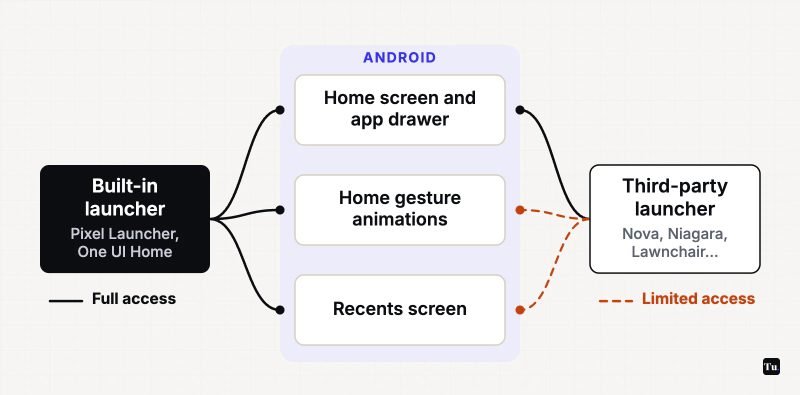
Android gives the built-in launcher special privileges for the home gesture and the Recents screen. A third-party launcher can't hook into those parts of the system the same way, and the developers of Lawnchair and Niagara both document the side effects:
- Rougher animations. The swipe-home and app-opening animations can stutter, skip or briefly show a blank home screen.
- A Recents screen that doesn't match. The app switcher usually stays the system's own, so your custom home screen and your multitasking view won't look like they belong together.
- Manufacturer limits. Lawnchair's documentation notes that some brands, such as Xiaomi, block gesture navigation entirely with custom launchers, and that some Oppo, OnePlus and Realme phones show a delay when returning home.
- Missing Google extras. Features like Pixel's At a Glance widget and the Discover feed are built into Google's launcher. Some alternatives recreate parts of them; most don't.
How noticeable this is depends heavily on your phone and Android version. If smooth gestures matter more to you than customization, stay with the stock launcher.
Who should still switch
- People trying to use their phone less. Minimal launchers that hide icons and filter notifications are the strongest reason to switch in 2026, because no phone maker offers anything quite like them.
- Owners of phones with cluttered or ad-heavy home screens. Some budget phones ship launchers with app suggestions and promotions. A clean third-party launcher fixes that.
- Tinkerers who want gesture shortcuts, custom grids and hidden apps beyond what their phone allows.
The launchers worth considering
Niagara Launcher
Best for: a minimal, one-handed home screen that still looks modern.
Niagara replaces the grid with a short vertical list of favorite apps and an alphabet strip you sweep with your thumb. You can read and reply to notifications from the home screen, and a notification summary bundles less important alerts. The developer states the free version is ad-free; Niagara Pro adds more customization.
Smart Launcher 6
Best for: people who never want to sort apps into folders again.
Smart Launcher automatically sorts apps into categories, adapts its colors to your wallpaper, keeps frequent actions near the bottom of the screen, and includes stackable widgets for weather, calendar, notes and more. It supports icon packs and Google Fonts. Optional gestures such as turning off the screen use Android's Accessibility permission, which you can leave off if you don't need them.
Lawnchair
Best for: a Pixel-style launcher on a non-Pixel phone, free and open source.
Lawnchair is built on Launcher3 from the Android Open Source Project, so it looks and behaves much like the Pixel Launcher while adding grid and icon controls, Material You theming, local search and At a Glance support. It's free with no ads or purchases. The catch is that the Play version is still labeled beta, and full Recents integration requires a separate root tool.
Nova Launcher
Best for: existing Nova Prime owners.
Nova is still deeply customizable, with icon shape controls, custom light and dark themes, a fast search with quick results, and Prime-only gestures and drawer groups. But the story has changed. Swedish company Instabridge bought it from Branch in January 2026, and the free version now carries ads. Instabridge has said Nova Prime stays ad-free and existing purchases are honored. If you already own Prime, it remains a solid choice; new users have better options above.
Microsoft Launcher
Best for: Microsoft account users who want calendar, to-dos and sticky notes on a swipe-over feed.
Microsoft Launcher is free with no ads or purchases, and it can import your current home screen layout or start fresh. Updates are less frequent than the others here, so expect fewer new features.
Olauncher and Before Launcher
Best for: cutting screen time.
Olauncher turns your home screen into a short list of text labels with no icons. It's free, open source under GPLv3, collects no data and shows no ads. Before Launcher takes a similar approach and adds a notification filter that quietly holds back low-priority alerts. Its developer promises no ads and no subscriptions, with a one-time purchase for the Pro features.
Galaxy owners: try Good Lock first
On a Samsung phone, Samsung's own Good Lock app includes a Home Up module that extends One UI Home with more layout options. Because it modifies Samsung's launcher rather than replacing it, you keep the system's own gesture animations. Good Lock's availability has varied by country over the years, so check the Play listing on your phone.
How to switch, and how to switch back
After installing a launcher, press the home button or swipe home and Android will usually ask which home app to use. To change it later on a Pixel, go to Settings > Apps > Default apps > Home app. On Samsung phones, it's Settings > Apps > Choose default apps > Home app. Other brands use similar wording in slightly different places. Your old home screen layout stays intact, so switching back is painless.
Before granting a launcher Accessibility or notification access, check our Android privacy and security settings guide to understand what those permissions allow.
The verdict
For most people, the stock launcher plus a little theming is enough, and you'll keep the smoothest gestures. Switch if you want a minimal phone (Niagara, Olauncher or Before Launcher), a Pixel feel on another brand (Lawnchair), or automatic organization (Smart Launcher). Before customizing anything, it's also worth checking the options your phone already has; our list of Android features most people never turn on is a good place to start, and our guide to productivity apps for Android pairs well with a distraction-free home screen.
Sources
- Lawnchair documentation: Gesture navigation issues
- Niagara Launcher Help: App launch animations
- Nova Launcher: An update (Instabridge acquisition)
- 9to5Google: Nova Launcher's new owners plan ads
- Google Play listing: Nova Launcher
- Google Play listing: Niagara Launcher
- Google Play listing: Smart Launcher 6
- Google Play listing: Lawnchair
- Google Play listing: Microsoft Launcher
- Google Play listing: Olauncher
- Google Play listing: Before Launcher
- Google Play listing: Good Lock