Most people who abandon a notes app don't do it because the app was bad. They do it because the app didn't match how they think, so notes piled up somewhere they never looked again. The note-taking apps for Android below are grouped by the kind of system they support, so you can pick one that fits your habits instead of the one with the longest feature list.
Our recommendations are based on each app's current Google Play listing, official pricing pages and documentation, reviewed in October 2026. Tech Usama hasn't tested these hands-on; where we give an opinion, we say so.
Three questions to answer first
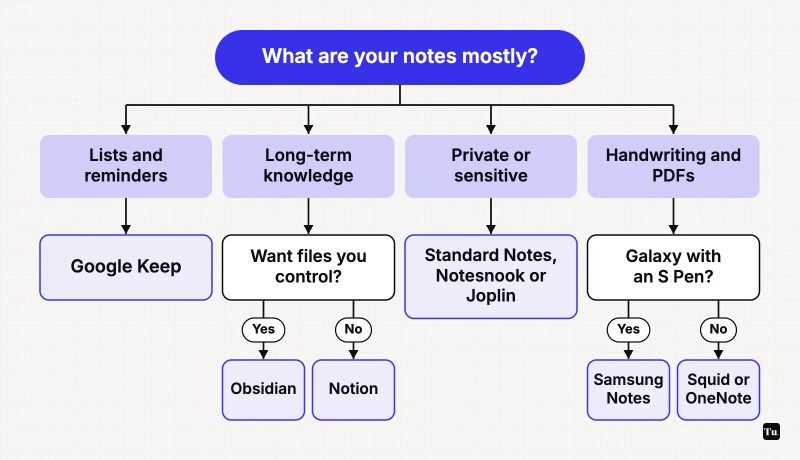
- What are your notes, mostly? Shopping lists and reminders, long-form writing and research, or handwritten sketches and annotated PDFs?
- Where should they live? On a company's servers (simplest), encrypted so the company can't read them, or as files on your own devices?
- What else do you use? If you work across Windows, Mac and a browser, cross-platform sync matters more than any single feature.
For quick capture: Google Keep
Google Keep is the digital equivalent of sticky notes. You can type a note, take a photo or record a voice memo, then color it, label it and pin it to the top. Home screen widgets and Wear OS tiles make capture fast, and shared lists work well for groceries. It's free, has no ads, and syncs with your Google account.
Where it falls short: there are no folders or nested structure, and formatting is basic. Keep is excellent for things you'll act on soon and poor for things you want to build on for years.
For a personal knowledge base: Obsidian
Obsidian stores notes as plain Markdown files in a folder you control, so they'll still open in any text editor in twenty years. Notes link to each other, a graph view shows the connections, and community plugins and themes let you shape it into almost anything. The app is free for personal and commercial use with no sign-up.
The tradeoff: syncing between devices is up to you. Obsidian's own Sync is an optional paid add-on with end-to-end encryption and version history. The learning curve is real, and in our opinion Obsidian rewards people who enjoy tinkering with their system.
For an all-in-one workspace: Notion or Anytype
Notion combines pages, databases, project boards and an AI assistant in one place, and it's the standard for shared team wikis. It's free to start. On a phone, it's better for reading and light edits than for fast capture.
Anytype offers a similar build-your-own-structure approach but keeps data on your device, encrypts it end to end, and can sync peer to peer. If you like Notion's flexibility but not the idea of everything sitting on Notion's servers, it's the alternative to look at.
For privacy: Standard Notes, Notesnook or Joplin
All three encrypt your notes before they leave the phone, so the sync service can't read them.
- Standard Notes is simple and long-lived; Proton acquired it in 2024 and committed to keeping it open source. The free tier syncs plain-text notes across devices. Paid plans add Markdown and other editors, more storage and file attachments.
- Notesnook has a generous free plan: unlimited notes and devices, with up to 50 notebooks and 50 tags. Encryption is always on and can't be turned off.
- Joplin is free and open source, stores notes in Markdown, and lets you choose the sync service: Joplin Cloud, Dropbox, OneDrive or Nextcloud, with optional end-to-end encryption. It also handles to-dos with reminders and can search inside attached PDFs and images.
For handwriting and PDFs: Squid, Samsung Notes or OneNote
If you write with a stylus, especially on a tablet, a handwriting-first app matters more than anything above.
- Squid supports low-latency ink, works with active pens such as the S Pen, and marks up, fills and signs PDFs. Notes stay on your device with no account required, and you choose where backups go. Some tools are paid extras.
- Samsung Notes comes preinstalled on Galaxy phones and tablets and is tightly tied to the S Pen. If you have a Galaxy device with a pen, try it before anything else; it isn't available for other brands.
- Microsoft OneNote is free, mixes typing, drawing and voice notes, and syncs with a Microsoft account. It's a strong choice if your school or employer already uses Microsoft 365.
A note on Evernote
Evernote is still on Google Play under its owner, Bending Spoons, but its free plan is now very limited: according to Evernote's plan comparison, it allows 50 notes, one notebook and one device. The app also shows ads. If you have years of notes there already, a paid plan may be worth it. For new users, we think the alternatives above are better value.
Plain text, nothing else: Simplenote
For people who just want text notes that sync everywhere, Simplenote from Automattic is free, has tags, pins and instant search, and doesn't try to be anything more.
Making your choice stick
Pick one app for capture and commit to it for a month. Put its widget on your home screen, move one week of existing notes into it, and resist adding a second app until the first one feels limiting. If you use a task app too, see how it pairs with your notes in our guide to productivity apps for Android. Students will find study-specific picks in Android apps for students, and if you're tempted to let AI summarize your notes, our guide to AI apps on Android explains what those tools do with your data.
Sources
- Google Play listing: Google Keep
- Google Play listing: Obsidian
- Obsidian pricing and licensing
- Google Play listing: Notion
- Google Play listing: Anytype
- Google Play listing: Standard Notes
- Neowin: Proton acquires Standard Notes
- Google Play listing: Notesnook
- Google Play listing: Joplin
- Joplin documentation
- Google Play listing: Squid
- Google Play listing: Samsung Notes
- Google Play listing: Microsoft OneNote
- Evernote plan comparison
- Google Play listing: Simplenote