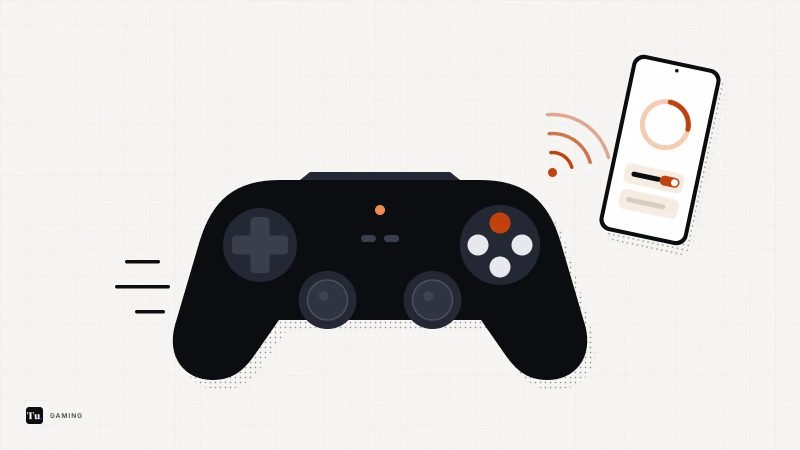
Touch controls work for card games and puzzles. Platformers, racers and shooters are a different story, because your thumbs cover half the screen and virtual sticks drift. Android games with controller support solve that, and connecting a pad takes about a minute once you know where the pairing button is.
This guide covers pairing first, then a list of games whose developers or official listings confirm controller support. We haven't tested each game with each controller ourselves. Support details come from Google Play listings, developer support pages and reputable coverage. Every game was live on Google Play in October 2026.
How to pair a controller with your Android phone
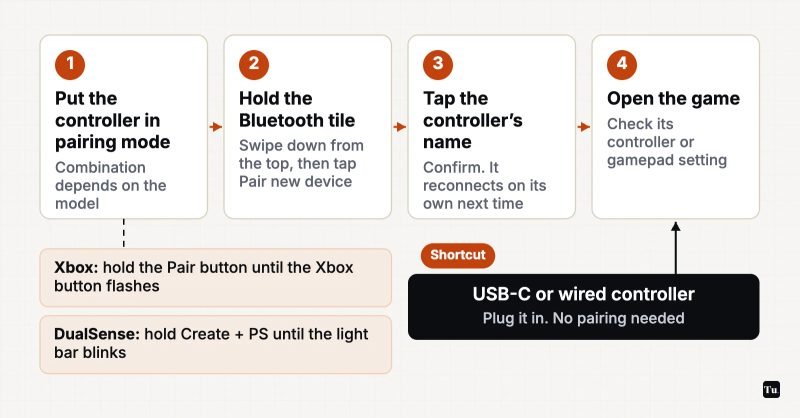
Bluetooth: the general steps
- Put the controller in pairing mode using the button combination for your model (below).
- Open Bluetooth pairing on the phone. Google's Android Help describes the quick route: swipe down from the top of the screen, touch and hold the Bluetooth icon, then tap Pair new device. You can also use Settings: on Pixels it's Settings > Connected devices > Pair new device, and on Samsung phones it's Settings > Connections > Bluetooth. Other brands, such as Xiaomi with HyperOS, use similar but not identical names.
- Tap the controller's name when it appears and confirm. After that it should reconnect automatically when you turn it on.
Pairing mode for common controllers
- Xbox Wireless Controller: Press the Xbox button to turn it on, then hold the small Pair button on the top edge for about three seconds until the Xbox button flashes quickly. It shows up as "Xbox Wireless Controller." Xbox Series X|S controllers support Bluetooth, but the earliest Xbox One controllers don't.
- PlayStation DualSense: Make sure the player indicator light is off. Hold the Create button and the PS button together until the light bar blinks. Sony says this needs Android 12 or later, and the adaptive triggers and haptic feedback don't work on Android phones. The controller still works fine for regular play.
- PlayStation DualShock 4: Hold the Share and PS buttons together until the light bar flashes.
- Other brands (8BitDo, Razer, GameSir and others): Pairing combinations vary, and some controllers have separate modes for Android, Switch and PC. Check the manual and choose the Android or "X-input" mode if there is one.
USB: plug and play
Phone-gripping controllers that plug straight into the USB-C port, and wired controllers connected through a USB-C cable or adapter, usually need no pairing. Android recognizes standard USB gamepads as soon as they're plugged in. Wired connections also avoid Bluetooth's small extra latency, and the controller doesn't need its own battery.
Games with confirmed controller support
| Game | What the developer says | How it charges |
|---|---|---|
| Stardew Valley | External controller support | Paid |
| Dead Cells | External controller support | Paid, paid DLC |
| Terraria | Bluetooth gamepads, fully remappable | Paid |
| GRID Autosport / GRID Legends | Gamepad alongside touch and tilt | Paid |
| Rush Rally 3 / Origins | Touch and game controllers | Paid plus IAP |
| GTA: San Andreas | Select Bluetooth and USB gamepads | Paid |
| Life is Strange | Full controller support | Free start, episodes via IAP |
| Oceanhorn | Touch or controller | Free first chapter, one unlock |
| Soul Knight | Controller supported | Free, ads and IAP |
| Vampire Survivors | Bluetooth controllers, 4-player couch co-op | Free, ads and IAP |
| Genshin Impact | DualShock 4, DualSense, Xbox controllers | Free, IAP |
| Call of Duty: Mobile | PlayStation, Xbox and Backbone controllers | Free, ads and IAP |
Premium games that feel made for a pad
Dead Cells is the clearest case. It's a fast, precise action roguelite where a real d-pad makes a big difference. Stardew Valley lists external controller support next to its touch and virtual-joystick options, which helps with fiddly tasks like tool selection. Terraria supports Bluetooth gamepads with fully remappable buttons, worth having for a game with that many items to juggle. For racing, Feral's GRID Autosport and GRID Legends both list gamepad support, and Brownmonster designed the Rush Rally controls for both touch and controllers. Rockstar's GTA: San Andreas works with select Bluetooth and USB gamepads, which makes a 70-hour open world much more comfortable.
Story and adventure
Square Enix's Android port of Life is Strange has full controller support, according to its listing. Episode 1 is free, and the rest are in-app purchases. Oceanhorn, a Zelda-style island adventure, supports touch or controller, and its free first chapter lets you try your setup before paying.
Couch co-op
Vampire Survivors lets up to four players share one phone or tablet, with each player on a Bluetooth controller and the game in landscape. Poncle suggests casting the screen to a TV. BombSquad supports a range of controllers and also lets friends use their phones as controllers with a free companion app. Soul Knight supports controllers for its co-op dungeon runs. Netflix members can add TMNT: Shredder's Revenge, a beat 'em up whose listing confirms Bluetooth controller support.
Free-to-play heavyweights
Genshin Impact took a long time to bring controller support to Android, finally adding it in Version 5.5 in March 2025. Supported pads are the DualShock 4, DualSense, Xbox Wireless Controller and Xbox Elite Series 2. Call of Duty: Mobile supports PlayStation, Xbox and Backbone controllers, but with two catches: menus still use touch, and controller players are matched against other controller players. Fortnite has supported Bluetooth controllers on Android since early 2019, and coverage of that update reported that most mainstream pads work.
Picking a controller
- Already own a console? Use its controller. Recent Xbox and PlayStation pads are the ones developers name most often in their support lists.
- Want something that fits in a bag? A telescopic USB-C controller holds the phone between its grips and needs no pairing or separate charging.
- Playing on a tablet or TV? A Bluetooth pad gives you distance from the screen. For multiplayer ideas, see our multiplayer Android games guide.
If inputs feel delayed, the cause is often the game's performance, not the controller. Our guides on Android gaming performance settings and reducing lag in mobile games help with that. For more racing games that work well with a gamepad, see our Android racing roundup.
Getting started
Pair whatever controller you already own, then start with Dead Cells, Stardew Valley or GRID Autosport, which all list controller support and are built around precise input. If the game doesn't respond, check its in-game settings before you blame the controller.
Sources
- Android Help: Connect to Bluetooth devices
- PlayStation Support: Pair a DualSense wireless controller via Bluetooth
- Xbox Support: Connect an Xbox Wireless Controller to an Android or iOS device
- Google Play listing: Stardew Valley
- Google Play listing: Dead Cells
- Google Play listing: Terraria
- Google Play listing: GRID Autosport
- Google Play listing: GRID Legends: Deluxe Edition
- Google Play listing: Rush Rally 3
- Google Play listing: Rush Rally Origins
- Google Play listing: Grand Theft Auto: San Andreas
- Google Play listing: Life is Strange
- Google Play listing: Oceanhorn
- Google Play listing: Soul Knight
- Google Play listing: BombSquad